How-To Guide
How to Use the Applicant Portal
Updated August 17, 2026
The Applicant Portal is Rural Care Journey's guided path from "is this opportunity worth pursuing" to "here's a draft package ready for review." It's organized around four steps — Find Opportunity, Check Eligibility, Build Package, and Expert Review — and you can jump back into any of them later; your progress is saved as an application under My Applications.
The Four Steps
| 1. Find Opportunity | Browse open NOFOs, RFAs, and grants across every tracked state. |
| 2. Check Eligibility | Pick a specific opportunity and run an AI-generated eligibility survey against its actual posted requirements. |
| 3. Build Package | Start from an AI-drafted, opportunity-specific template, or upload your own draft (PDF, DOCX, TXT, or Markdown) and edit it in place. |
| 4. Expert Review | Request a human review from RCJ grant specialists once your draft is in good shape. |
Step 1 — Find an Opportunity
- 1Go to the Applicant Portal and click "Find Opportunity," or browse Opportunities directly and filter by state, type, or status.
- 2Open any opportunity's detail page. If you want AI research on it first — a plain-language summary, who's eligible, what the budget covers — use "Launch Intelligence" to ask questions against the actual source document before committing to it.
- 3When you're ready to apply, click "Ready to apply?" from the Intelligence page (or go straight to the Applicant Portal with that opportunity selected). This creates your application and takes you to Step 2 automatically.
Step 2 — Check Eligibility
This is where the portal earns its keep: instead of a generic checklist, it reads the actual grant document for the opportunity you picked and extracts real eligibility criteria — organization type, geography, financial requirements, required attachments, and capacity thresholds. That takes 5–15 seconds the first time, then it's cached.
Answer each question with the option that fits (the choices adapt to the question — "Yes, we qualify" / "No, we don't" / "Not sure" for a straightforward eligibility test; "Fully met" / "Partially" / "Not met" for a threshold requirement; "Have it ready" / "Can obtain it" / "We don't have it" for a required document). The survey auto-saves as you go — there's no separate save step.
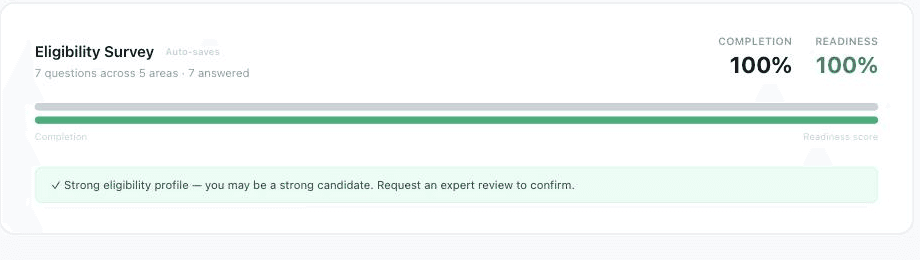
A fully answered survey — completion and readiness are tracked separately.
Once you've answered everything, you get a plain-language eligibility assessment — how many requirements you meet, how many need attention, and any real gaps — plus your next move.
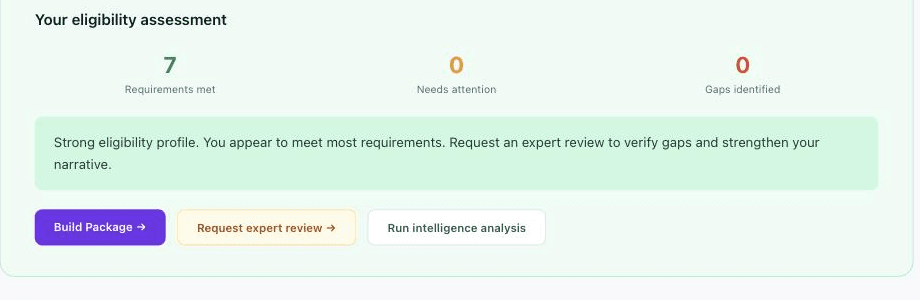
A strong result unlocks Build Package and Expert Review directly from this card.
Step 3 — Build Package
From here you choose how to start your application draft:
- Use AI-powered template — generates narrative sections from this specific opportunity's requirements and guidance, which you then edit.
- Upload your draft — bring an existing PDF, DOCX, TXT, or Markdown draft and edit it in place for this opportunity instead of starting from a blank template.
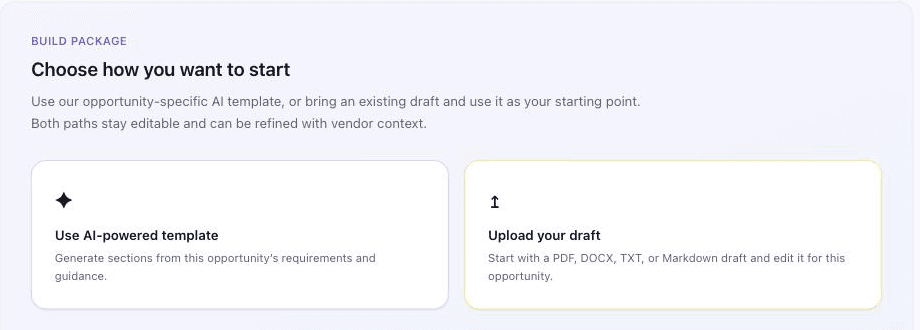
Both paths land in the same editable draft — pick whichever gets you further, faster.
Either way, the draft stays editable afterward and can be refined with vendor context — if your project needs an implementation partner, pull details from a matched vendor profile straight into the narrative.
Step 4 — Expert Review
When your package is in a reasonable state, request a review from RCJ's grant specialists directly from the eligibility assessment card. This is a human review, not another AI pass — use it to catch gaps an eligibility survey can't, like narrative strength or a weak sustainability plan.
Tracking Your Applications
Every opportunity you start on becomes an entry under My Applications (accessible from the Applicant Portal's top button), with three at-a-glance counts — Active, Submitted, Awarded — and per-application survey completion and eligibility readiness bars. Pick up any in-progress application right where you left off with Continue, or remove one you're no longer pursuing.
FAQ
- Do I have to complete the eligibility survey before I can build a package? No, but it's the fastest way to know whether the opportunity is worth the effort before you draft anything — a low readiness score is a signal to look elsewhere, not a hard gate.
- Can I switch opportunities partway through? Yes — go back to Find Opportunity and start a new application; your existing ones stay untouched under My Applications.
- Does uploading a draft overwrite my AI template, or vice versa? No — you choose one starting point per application at Build Package; pick whichever gets you closer to a finished draft.
- Is Expert Review required before I submit to the actual funder? No — Rural Care Journey doesn't submit anything on your behalf. Expert Review strengthens your draft; the actual submission always happens on the issuing agency's own portal.
Start Your Application
Find an open opportunity and run its eligibility survey — most take a few minutes and tell you immediately whether it's worth pursuing.